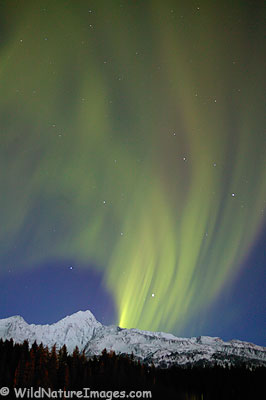
Yesterday I wrote about finding aurora borealis, today how to actually photograph the aurora Borealis.
Tripod
The main requirement is a tripod. Your exposures will be at least 10 seconds and possibly more, there is no way to hand hold the camera and get decent results.
Lenses
You also want to use the fastest wide angle lens you own. Most consumer wide angle zoom lenses are f/3.5, this is barely fast enough. A f/2.8 or f/2.4 is much better. Many SLR cameras come with a 50mm prime lens that most people quickly replace with a more convenient zoom lens. If you still have an old 50mm prime lens laying around, dig it out – it will probably be the fastest lens you own. I have an old f/1.8 that works great. The problem with a 50mm lens is that it isn’t wide enough to capture the full band in most auroras, you usually need a wider lens – more like 28mm or wider. Serious aurora photographers usually own at least one f/1.4 wide angle prime lens. These can be somewhat expensive, and very specialized since most nature photographers don’t need fast wide angles because they are stopping down to maximize depth of field for landscape photography.
Shutter Speed
The idea behind using a fast lens is to reduce the shutter speed by as much as possible. Auroras can have lots of interesting details in their bands and rays, but these details are largely lost with exposures in excess of 30 seconds – the wonderful color is still there, but longer exposures turns the details in to blobs of colors.
ISO Settings
Another way to reduce the shutter speed is to increase the ISO settings on digital cameras, or use higher speed film. Today most people seem to use digital cameras, so my discussion will focus on these. Higher ISO settings on digital cameras lead to increased image noise, especially in dark areas, I would use the highest ISO setting that you can live with noise wise. I have no problem using my Canon 5D Mark II at 1600 ISO, and wouldn’t hesitate to go to 3200, above that, things get fairly noisy. Because of the lack of detail in auroras, these type of images do respond well to noise reduction efforts in Photoshop.
Focus
Since the Aurora is far away, you can set focus on infinity and forget about it. Test your lens in advance in daylight, some lenses need to be backed off slightly from full infinity for proper focus.
Noise Reduction
I talked about image noise from using high iso settings, but there is another kind of noise to be concerned about during long exposures with digital cameras, and that is sensor noise. Update: I no longer use noise reduction – it doubles the exposure time for each image and the penalty isn’t worth the benefit.
Exposure
OK, you have a tripod, lens opened all the way, iso set high, focus at infinity – now you are ready to start shooting. I typically start with about a 20 second exposure and adjust from there based upon what I’m seeing on the histogram. The top photo for reference was 10 seconds at f/2.8 and 320 iso. Exposures can really vary widely depending on the brightness of the aurora and moon, and this is why I rely heavily on the histogram.
Moon Light
Speaking of the moon, a moon lit night can be very helpful at lighting up the surrounding countryside not only adding to the composition possibilities, but the moon makes it much easier to shoot and for walking. It does take a pretty good aurora to compete with the light from a full moon.
Other tools
A headlamp can be very valuable when shooting at night. Be sure to turn your headlamp and any car lights off before taking your photo, as stray light can be a problem with long exposures. A shutter release can be helpful as it reduces camera shake, I often use my two second timer instead. Since auroras are often found in the winter, this entry on winter photography tips may also be helpful.
Composition
Including a mountain, tree or other subject matter can help aurora photos. It is nice to have a reference point for scale. Experiment, horizontal and vertical, include the moon and leave it out, including the surroundings, even shoot straight up, anything goes.
Patience
The biggest secret to Aurora photography is patience. Good aurora photographers spend many nights out in the cold sitting, waiting and even sleeping in their vehicles.


Comments 85
tnx for info, i live in the far north of scotland and have seen many auroras but never had a camera ! . my other hobby is amateur radio and can reflect my transmit signal on the vhf band. ( 2m and 6m ). for early warning check POES NOAA and if the activity reaches ten, dont watch tv. GET OUT AND HAVE A LOOK!!
Tnx info from amateur radio station located in Wick , the far north of Scotland. I use aurora for contacts. many sites available for aurora NOAA POES is good. Jim GM8LFB.
Ok it my real name not many two legged ones left !
myths about aurora: its only seen on frosty night. what a surpise in fact aurora is linked to the sunspot cycle. We are just heading upwards at the moment so in two years au should be seen at lower latitueds. au happens day and night we just dont see it!. This is because of location. , cloud cover, and watching Emmerdale or Corrie!! . Radio signals bounce off au and give early warning of an event. This is very useful for photographers.. so check out the many sites that au warnings, many of witch you can get on your mobile phone. I hope this info may be useful. Jim GM8LFB
Author
Hi Jim – thanks for the comments and the information! Good to know.
I have been taking northern lights photos now for 3 years on my olympus dslr. I’m tired of the 1:2 processor and plan to buy the new canon 7D. My lens research is telling me that all the f/1.4-1.8 lenses produce poor results with soft borders. All the reviews were based on photos taken under normal lighting situations. Will longer exposures produce better results? My choices are canon 24mm f/1.4L ll USM, canon f/1.8 USM, and sigma AF 20mm f/1.8 EX. My goal is to capture reds in the aurora which I couldn’t do with olympus. Do you have any advice for me? Thanks.
Author
Hi Matt,
You know soft corners seem to plague most wide angle lenses, and shooting wide open usually exasperates the issue. I don’t think long exposures will help the situation, but I don’t think soft corners will be very noticeable when it comes to aurora photography. Even if the moon is out, night images tend to lack a lot of detail anyway, and auroras by there nature lack detail, so I don’t think it will be a problem.
The 7D sounds like a great camera – you should have fun with it! Now I wish there was more activity, it has been another slow year.
Hi Ron, do you think the 24mm f/1.4L ll USM is worth spending the $1100 more than the 28mm f/1.8 USM considering it is only 9 degrees wider and f/.4 larger aperature?
did some have been in finland in winter to have photos? how is experience over the artic circle?
Author
Hi Matt – missed your comment from before, so this is probably a little late. Hard to say if it is worth the extra money given the performance of today’s cameras at high iso settings, although, the 24 f/1.4 has to be just about the perfect northern lights lens.
Rod – when you get close to or above the Arctic Circle you usually have a better chance of seeing the Northern Lights.
Nice! But what about film? I’m traveling to Iceland this January and hope to take photos. But I’m thinking of bringing my old manual.
Author
Thanks. Film is basically the same, although you won’t have the ISO speed you would have with digital. Good luck.
Pingback: Photographing Aurora Borealis in Northern Europe | OLAF BATHKE - The Adventure of Being a Photographer
Thanks for great information! I am always impressed with qualities of your images. I just moved to Fairbanks. I’ll start shooting the northern lights tonight.
Author
Thanks a lot Sunny – you are in a great place for Northern Lights! Good luck.
Pingback: tutorial travel photography – episode 2 | Arved Gintenreiter Photography Blog
Pingback: tutorial travel photography – episode 2 – Arved Gintenreiter Photography Blog
Good advice. Also don’t forgot to remove the UV filter from the lens. Aurora images are much nicer without those extra ghost rings in the shot.
You mentioned using a headlamp, and turning it off during the shot. If nighttime ambient light is limited (no moon), I sometimes “paint” parts of the foreground with my LED headlamp. In certain shots, I find this works quite well.
Author
Great advice Jansen! I don’t use UV filters, so I forget to mention it – thanks. Light painting really opens up a whole new world of creative possibilities.
Thanks a lot for all these advices !
What about the white balance ?
I’m in France and an solar irruption just happened, and to night we could (maybe) see polar lights… Do you believe it …
I will see !
Author
Good question – I leave white balance on auto – does a fine job. Good luck!
Hi Ron … can you clarify? Do you suggest to use it – or turn it off? Thanks!
….
Update: **** I no longer use noise reduction **** it doubles the exposure time for each image and the penalty isn’t worth the benefit.
Exposure
OK, you have a tripod, lens opened all the way, iso set high, focus at infinity *** and noise reduction on ****
…..
Author
Hi Dan,
Sorry about that – I tried to quickly update that post and missed the second reference to noise reduction. I leave it off – it takes too much time.
Hello Family members of photographers
Am in Malangen Brygger,Tromso, Norway looking forward to see the Northern lights
Pingback: How to Photograph the Aurora Borealis | Daily Life - Popular Question & Answer
Ka?dy z nas zetkn?? si? z problemem, doradzam zapoznanie si? z problemem.
Hi! Great info and tips to capture the northern lights! Thanks for sharing.
I just got the chance to film this in real time video last week, and just wanted to share with you. Let’s spread the light! 😀
https://vimeo.com/141923748
As the elephant and trained guides lead you through the terrain they
are fully aware so well, you’ll be amazed at the bond that may be formed with your
gentle and majestic creatures within a few hours.
Not all travel cover packages have comprehensive
coverage; the truth is, a lot of them don’t. Next day, we make introduction section with other climbing members & Expedition crews
I blog often and I really thank you for your information. Your article has really
peaked my interest. I’m going to book mark your site and keep checking for new details about
once a week. I subscribed to your Feed as well.
Lovely shot!
Fantastic
Awesome
Great Blog!
Thanks for sharing with us
Very informative!